BookingSG

Booking Platform for
public services in Singapore
Booking Platform for
public services in Singapore
DURATION

5 months

Client

GovTech
Singapore

ROLE

UX Researcher
UI/UX Designer

SUMMARY

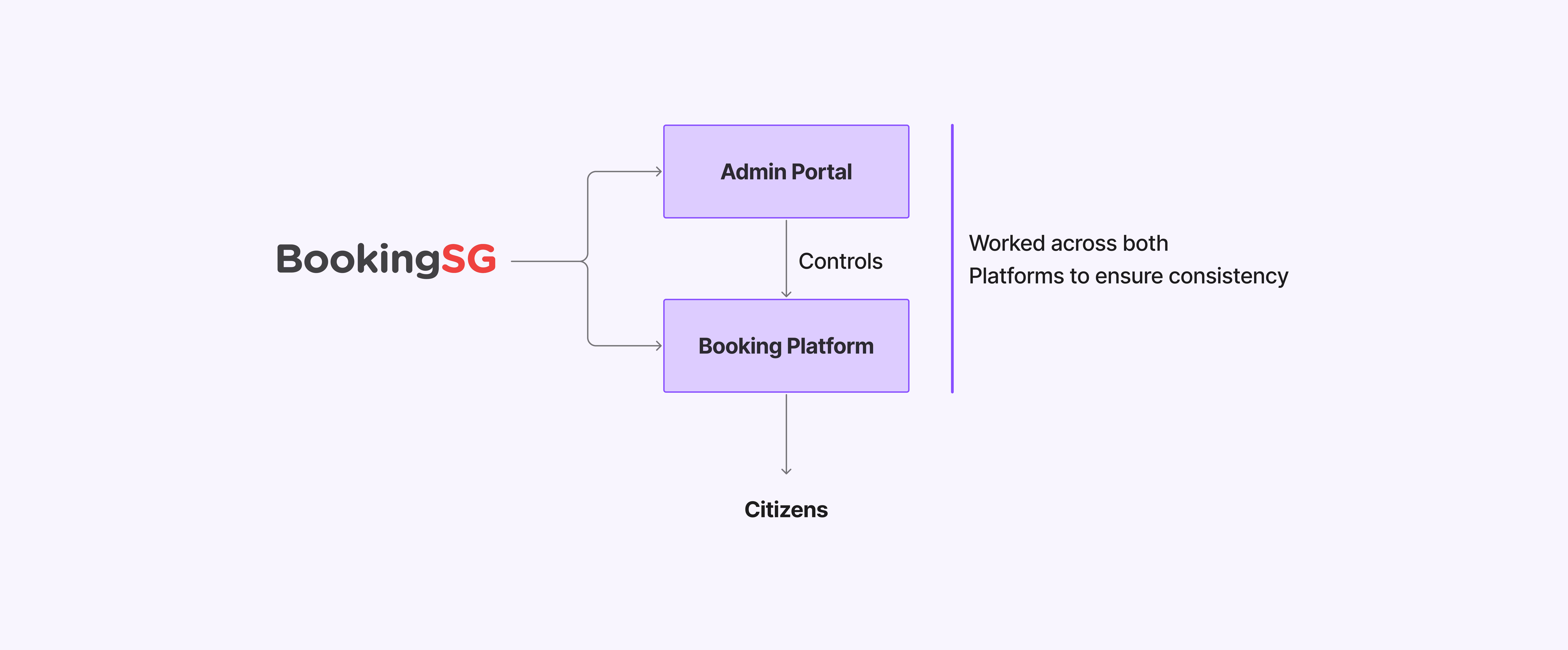
My work as an intern for BookingSG, a product under GovTech Singapore that aims to create a booking platform that is customisable for varying use scenarios across whole of government.

Disclaimer!

Due to confidentiality, certain details of this project cannot be disclosed.
Metrics are presented in ranges, and visuals have been modified and redesigned or are not shown to protect sensitive information.

Client & Product
The Government Technology Agency of Singapore (GovTech) drives the digital transformation of Singapore’s public sector. It develops and manages key platforms, applications, and digital services to improve the lives of citizens and businesses, while supporting Smart Nation initiatives.

GovTech works closely with government agencies to design human-centered, secure, and scalable digital solutions.
The Government Technology Agency of Singapore (GovTech) drives the digital transformation of Singapore’s public sector. It develops and manages key platforms, applications, and digital services to improve the lives of citizens and businesses, while supporting Smart Nation initiatives.

GovTech works closely with government agencies to design human-centered, secure, and scalable digital solutions.

BookingSG

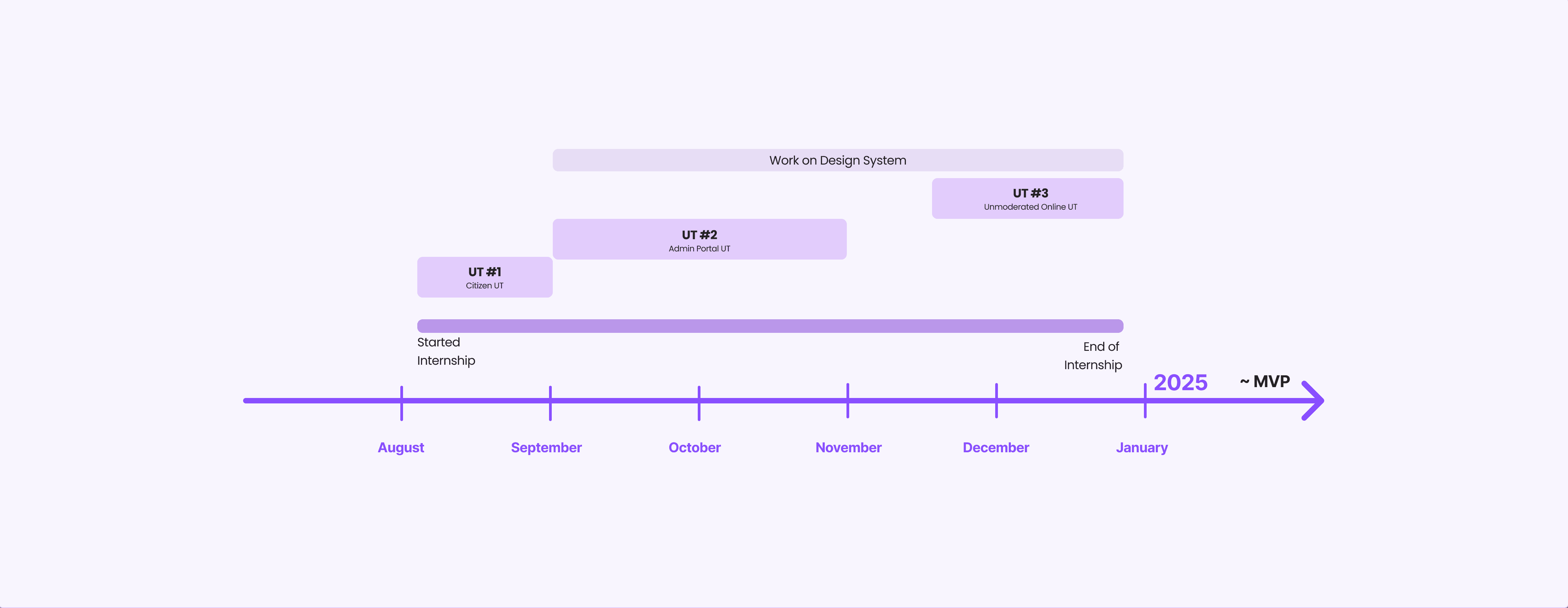
Involvement Timeline

UX Research Involvement

#`1 Usability Testing for Citizen-Facing Booking System
Goal

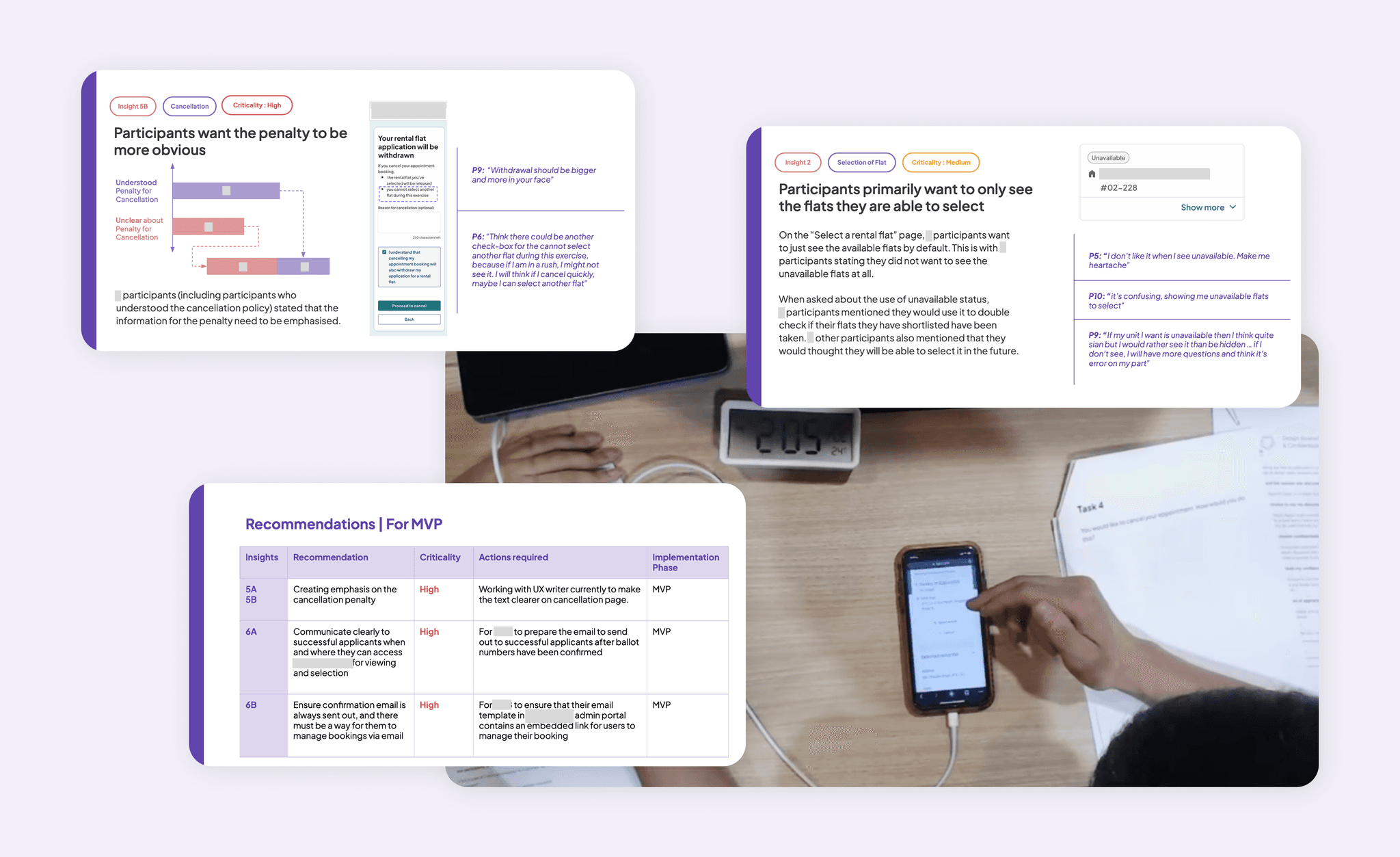
To assess user satisfaction, identify any interaction pitfalls, and overall concerns that participants may have when completing a booking form for a conceptual housing service.

To assess user satisfaction, identify any interaction pitfalls, and overall concerns that participants may have when completing a booking form for a conceptual housing service.

Role

For this test, I worked with one other designer.
My role during this research study was of :

  1. Facilitator and Scribe - Conducted and aided in the in-person test sessions.

  2. UX Analyst - coded and analysed the data gathered on Maze and video recordings of the test.

For this test, I worked with one other designer.
My role during this research study was of :

  1. Facilitator and Scribe - Conducted and aided in the in-person test sessions.

  2. UX Analyst - coded and analysed the data gathered on Maze and video recordings of the test.

Participants

Request for Trends

Request for Trends

Participants were recruited from a pool of middle-aged citizens who share similar interest in a particular housing program.

The participant numbers were in low double digits.

The test was conducted in-person in a UX lab.

Participants were recruited from a pool of middle-aged citizens who share similar interest in a particular housing program.

The participant numbers were in low double digits.

The test was conducted in-person in a UX lab.

Reflection

  1. Asking the Right Questions

    Participating in one of my first structured usability tests in a UX lab taught me the importance of asking effective, unbiased questions. I learned how to facilitate sessions without leading participants, and how to ask questions that revealed genuine user behaviors and insights.

  2. Synthesising insights so that the data is digestible for stakeholders

    Presenting findings to stakeholders required more than just reporting observations. I learned to organise results into clear themes and levels of criticality, ensuring that the data was both digestible and directly relevant to the goals of various agencies involved.

  3. Prioritisation of Recommendations

    I gained an appreciation for the balance between user needs and practical constraints. Not all suggestions could be implemented at once, so I learned how to prioritise recommendations based on their impact, feasibility, and available resources. This helped us distinguish between what should be addressed in the MVP versus what could be considered for future iterations.

#2 Usability Testing for Creation of Bookings (Admin Portal)
Goal

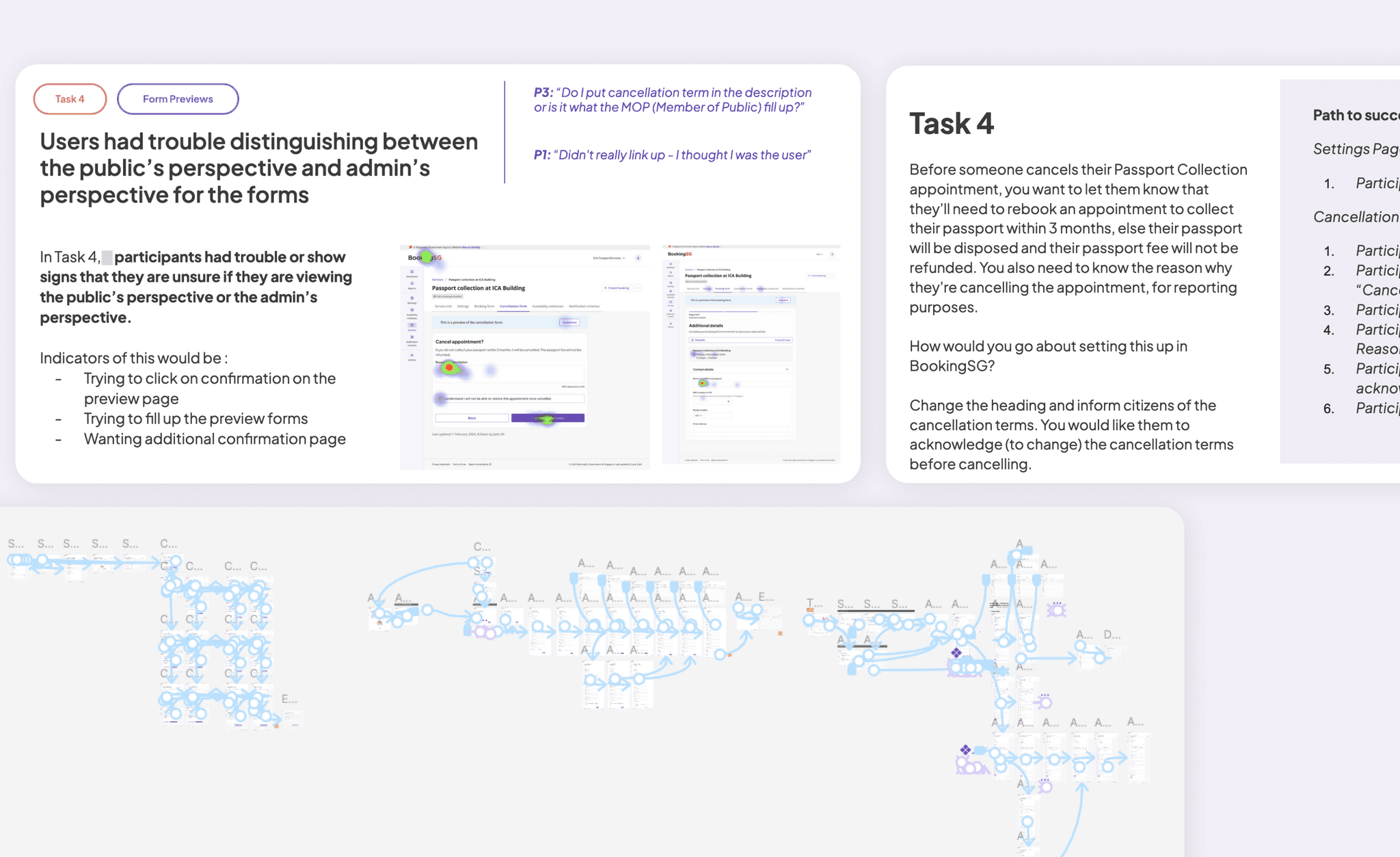
To assess the overall concerns about usability and the process that participants may have while making government related services that the citizens can book.

To assess the overall concerns about usability and the process that participants may have while making government related services that the citizens can book.

Role

Request for Trends

Request for Trends

For this test, I worked with two other designers.
My role during this research study was of :

  1. Prototype Designer - For this test, I was in charge of creating the various tasks for the test and creating the prototype to match the tasks designed.

  2. Facilitator and Scribe - Conducted and aided in the in-person test sessions.

  3. UX Analyst - coded and analysed the data gathered on Maze and video recordings of the test.

For this test, I worked with two other designers.
My role during this research study was of :

  1. Prototype Designer - For this test, I was in charge of creating the various tasks for the test and creating the prototype to match the tasks designed.

  2. Facilitator and Scribe - Conducted and aided in the in-person test sessions.

  3. UX Analyst - coded and analysed the data gathered on Maze and video recordings of the test.

Participants

Request for Trends

Request for Trends

Participants were recruited from the current public service workers who are in charge of creation of services and bookings.

The participant numbers were in high single digit and the participants spanned across various government agencies. The participants also have high level of working experience in their job scope.

The test was conducted in-person at various locations in a office setting.

Participants were recruited from the current public service workers who are in charge of creation of services and bookings.

The participant numbers were in high single digit and the participants spanned across various government agencies. The participants also have high level of working experience in their job scope.

The test was conducted in-person at various locations in a office setting.

Reflection

  1. Structuring the Usability Test

    As I was in charge of designing the tasks for this test, I learnt the importance of structuring the test well to assess various key points of contention in the design prototype. I learnt that the first few tasks should ease the user into the design while the last few tasks should be used to repeat certain tasks to assess the learnability of the design.

  2. Importance of Click/Tap Order

    One of the insights that I was recommended to look into during the analysis was the click/tap order in the design. I learnt that the 1st or the 2nd click/tap usually give the insight on the intuition of the user and it highlighted certain key usability issues such as affordances of certain design elements.

  3. UX Writing is Contextual

    One of the biggest challenge of the admin portal design was that different government agencies used different wordings for similar or exact tasks. Hence, the design of the admin portal that would host these tasks need to be carefully standardised to accommodate different contexts.

#3 Testing the new Multi-select feature through online participants
Goal

With the revision to the BookingSG design, the team was presented with an opportunity to redesign the selection page for the selection of bookings by the public as the clients wanted just one page to book multiple slots at once.

Hence, a multi-select booking logic needed to be designed and tested.

With the revision to the BookingSG design, the team was presented with an opportunity to redesign the selection page for the selection of bookings by the public as the clients wanted just one page to book multiple slots at once.

Hence, a multi-select booking logic needed to be designed and tested.

Role

For this test, I worked with two other designers.
My role during this research study was of :

  1. UX Designer - I was tasked to be the owner of this feature and I researched the best practice of other booking applications.

  2. Prototype Designer - For this test, I was also in charge of creating the various tasks for the test and creating the prototype to match the tasks designed. The prototype was then hosted on Maze.

  3. Analyst - coded and analysed the data gathered on Maze.

Participants

Participants were recruited from an online crowdsourcing platform and were given the online maze link to complete the task on their own devices.

The test was an online unmoderated test and the participant numbers were in the range of 100 to 150 people.

Multi Selection Logic Design

The scope given was that :

  1. The slots must be booked consecutively

  2. The interaction should be seamlessly integrated into the interface, ensuring that users intuitively understand they cannot select more than the maximum timeslots given to them, without making the maximum slots obvious.
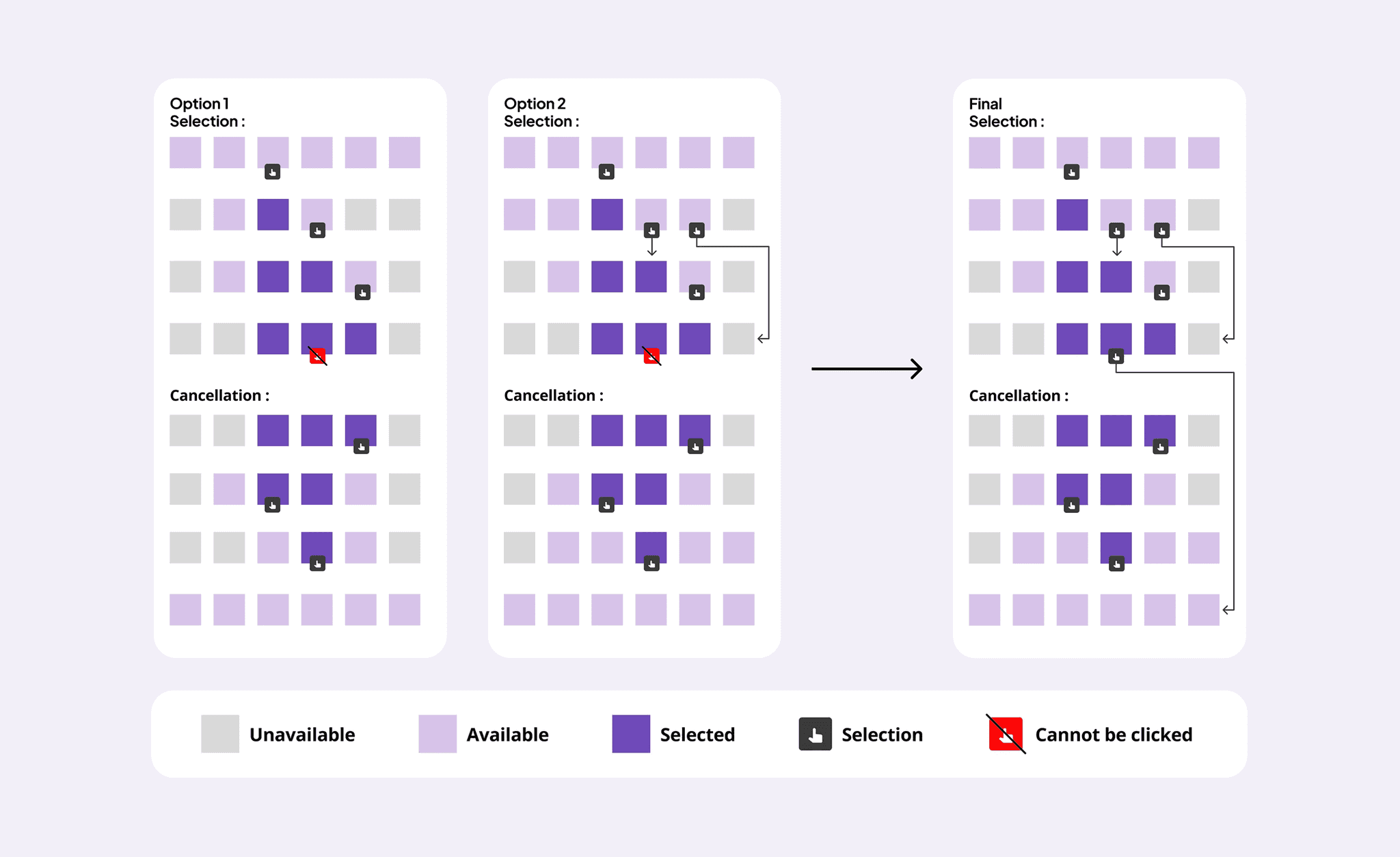
Multi-select Logic Research and Ideation

Option 1 focuses on limiting the affordance of the users to only allow users to click consecutive slots while option 2 focuses on the visibility of available slots and would allow users to select the maximum available slots in one click.

Ultimately, the team chose option 2 as visibility of maximum slots varies within services and it was important that it is seen.
Furthermore, this aligned with the best practice for varying other platforms with booking features.

Option 1 focuses on limiting the affordance of the users to only allow users to click consecutive slots while option 2 focuses on the visibility of available slots and would allow users to select the maximum available slots in one click.

Ultimately, the team chose option 2 as visibility of maximum slots varies within services and it was important that it is seen.
Furthermore, this aligned with the best practice for varying other platforms with booking features.

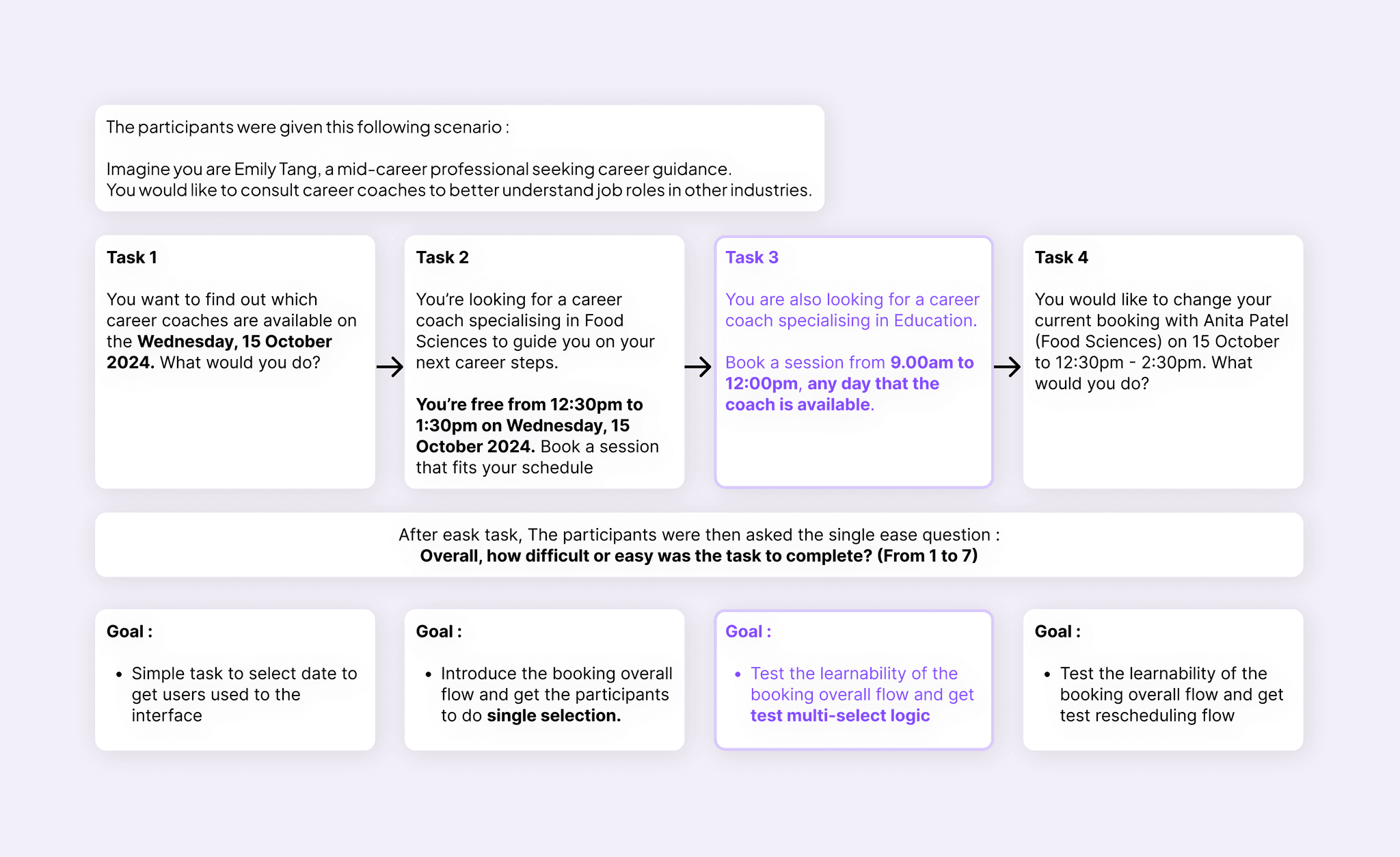
Usability Test Design

The above multi selection logic was then tested with an imaginary scenario of booking a career coach to get insights on how users would interact with multi-selection booking interface.

The above multi selection logic was then tested with an imaginary scenario of booking a career coach to get insights on how users would interact with multi-selection booking interface.

Analysis

The focus will be on Task 3 as it is used to test out the new feature request

Ideal Task 3 Flow :
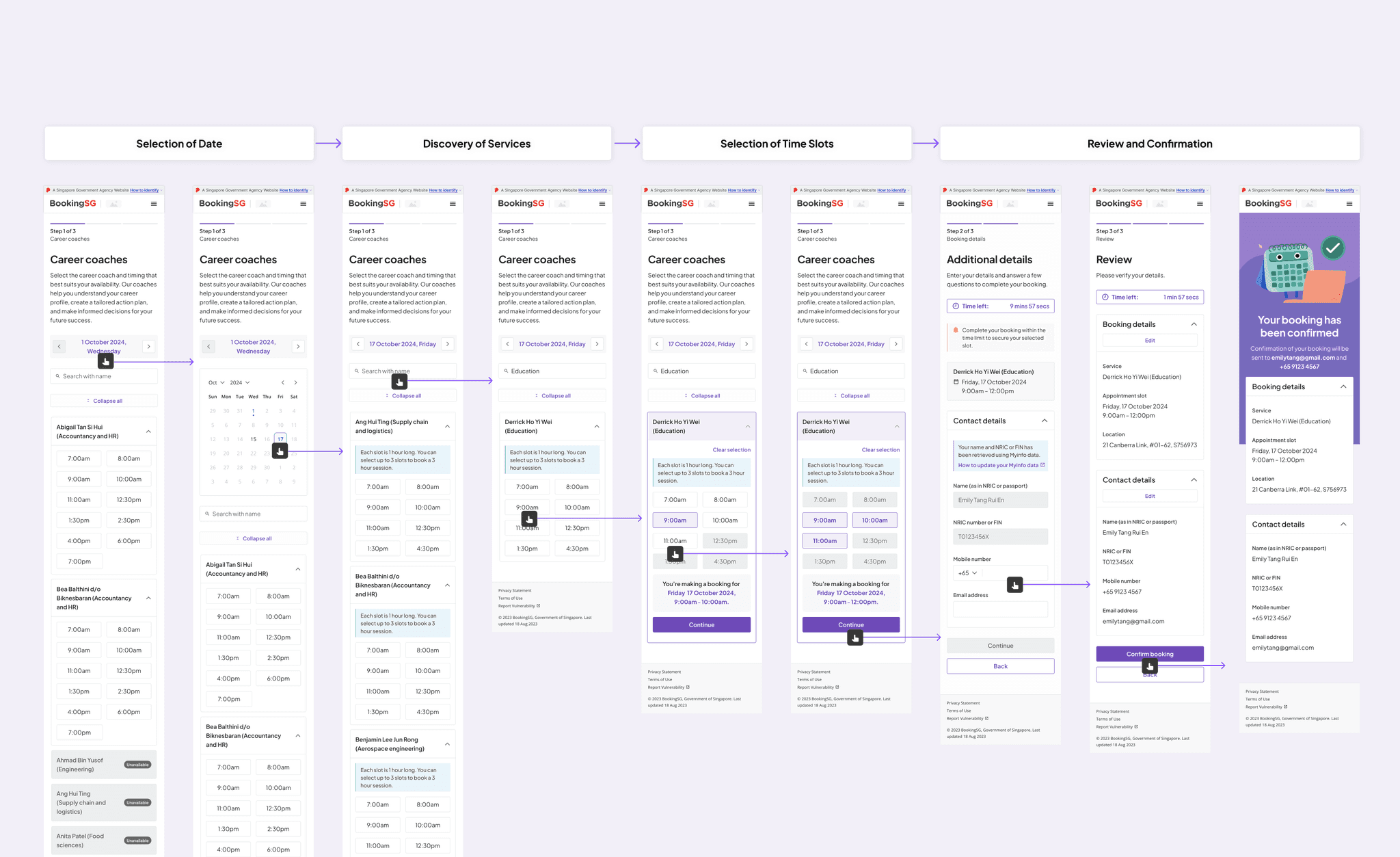

Task 3 Demo
General Statistics of Task 3
Total attempt : ~125+
Average Duration : ~109s
Success Rate : ~76%
Success Rate : ~76%
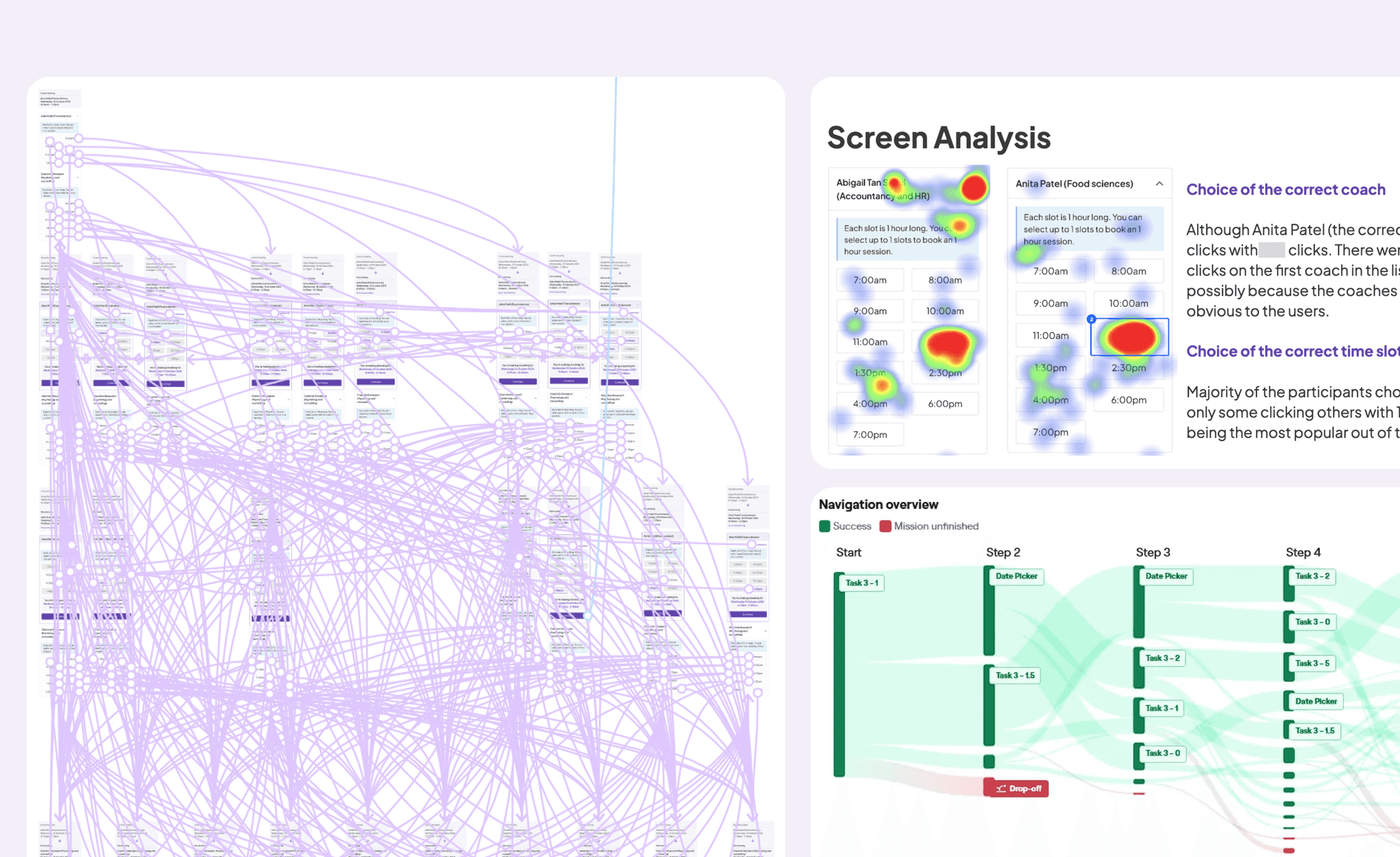
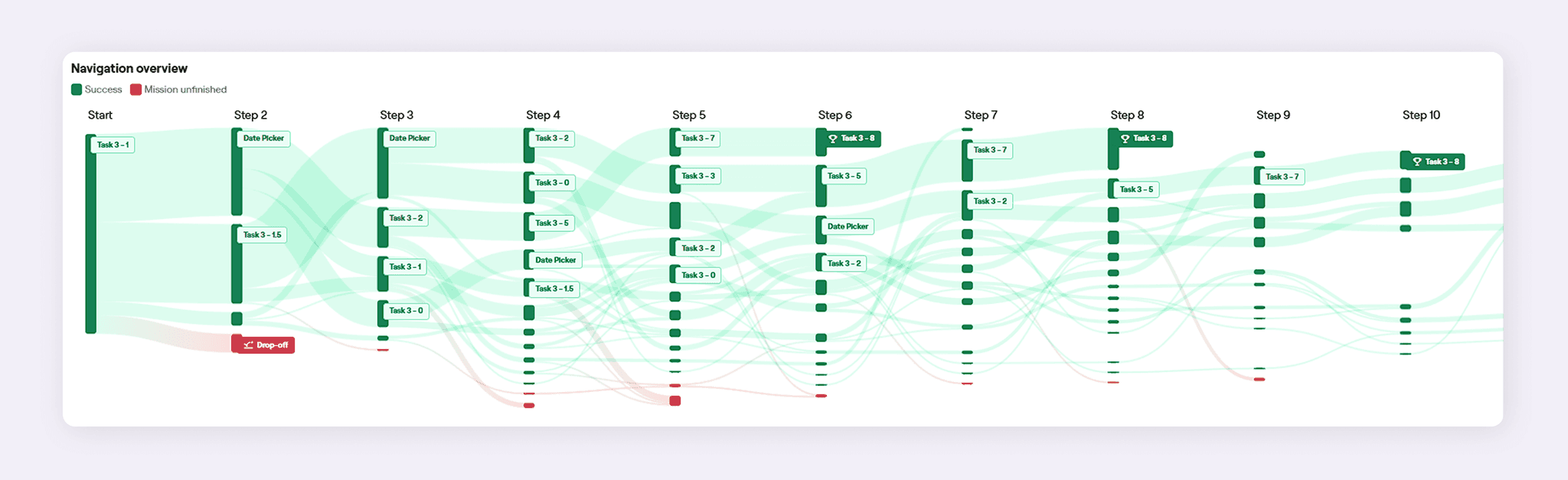
Analysing the User Flow

Insight #1

The bulk of the drop-off (~10%) are from the main starting screen and this could be potentially due to inactivity or difficulty in discovery of services.

Insight #1

The bulk of the drop-off (~10%) are from the main starting screen and this could be potentially due to inactivity or difficulty in discovery of services.

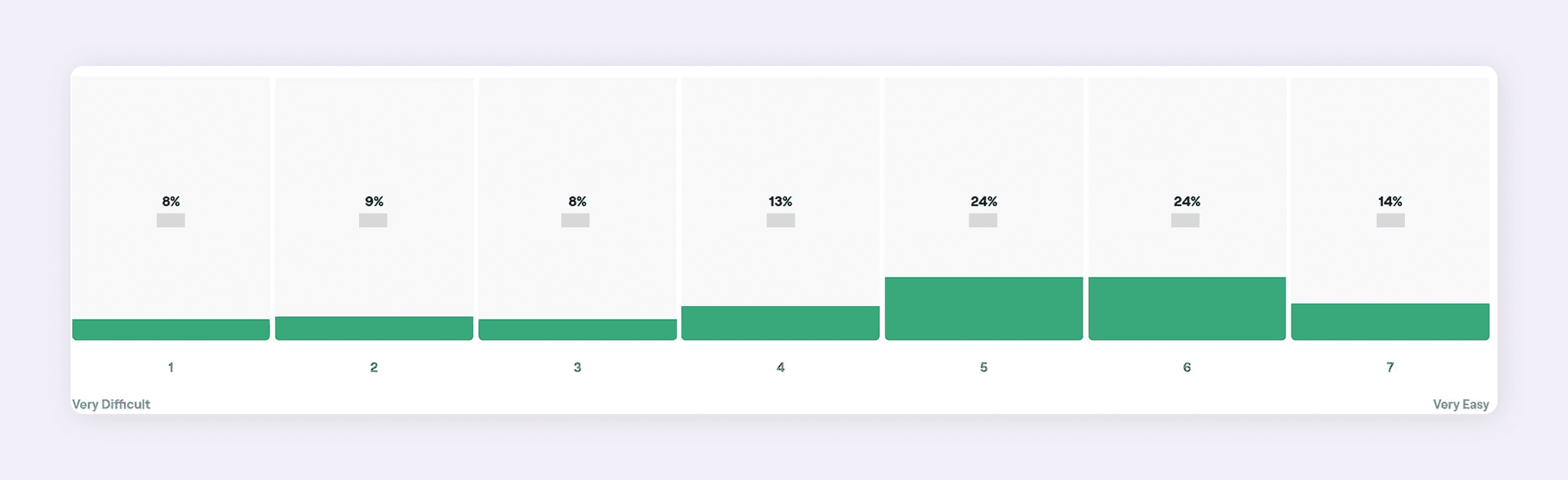
Analysing the Single Ease Questions

Insight #2

When analysing the comments given by participants who rated <6 :

Majority of the feedback were regarding the discovery of the services - with suggestions being made to add filter or adding category feature.


Insight #2

When analysing the comments given by participants who rated <6 :

Majority of the feedback were regarding the discovery of the services - with suggestions being made to add filter or adding category feature.


"select specialisation first, so that the coaches can be filtered out. Not show them all at once, and get user to then scroll down mostly irrelevant options."

(rated 3)
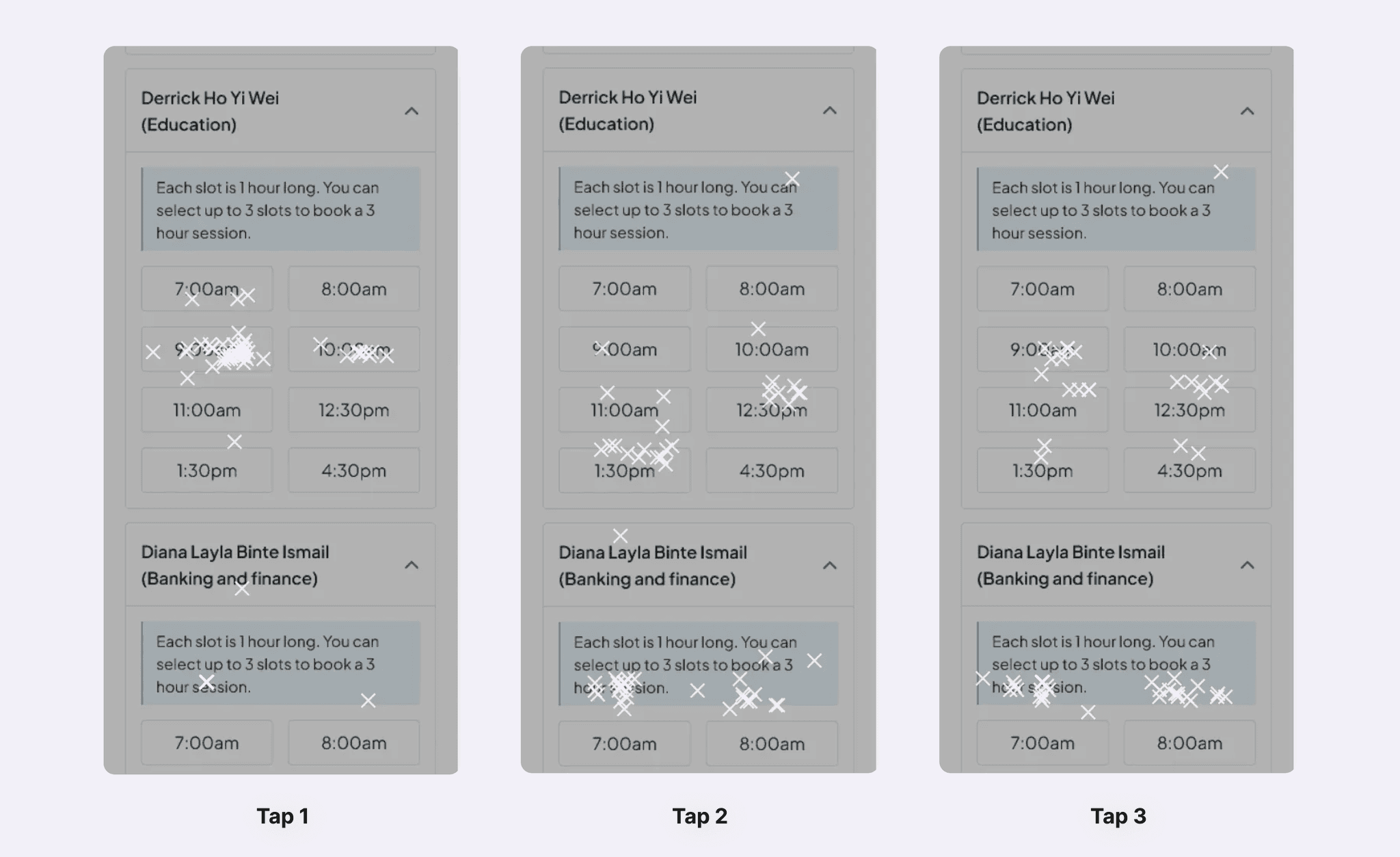
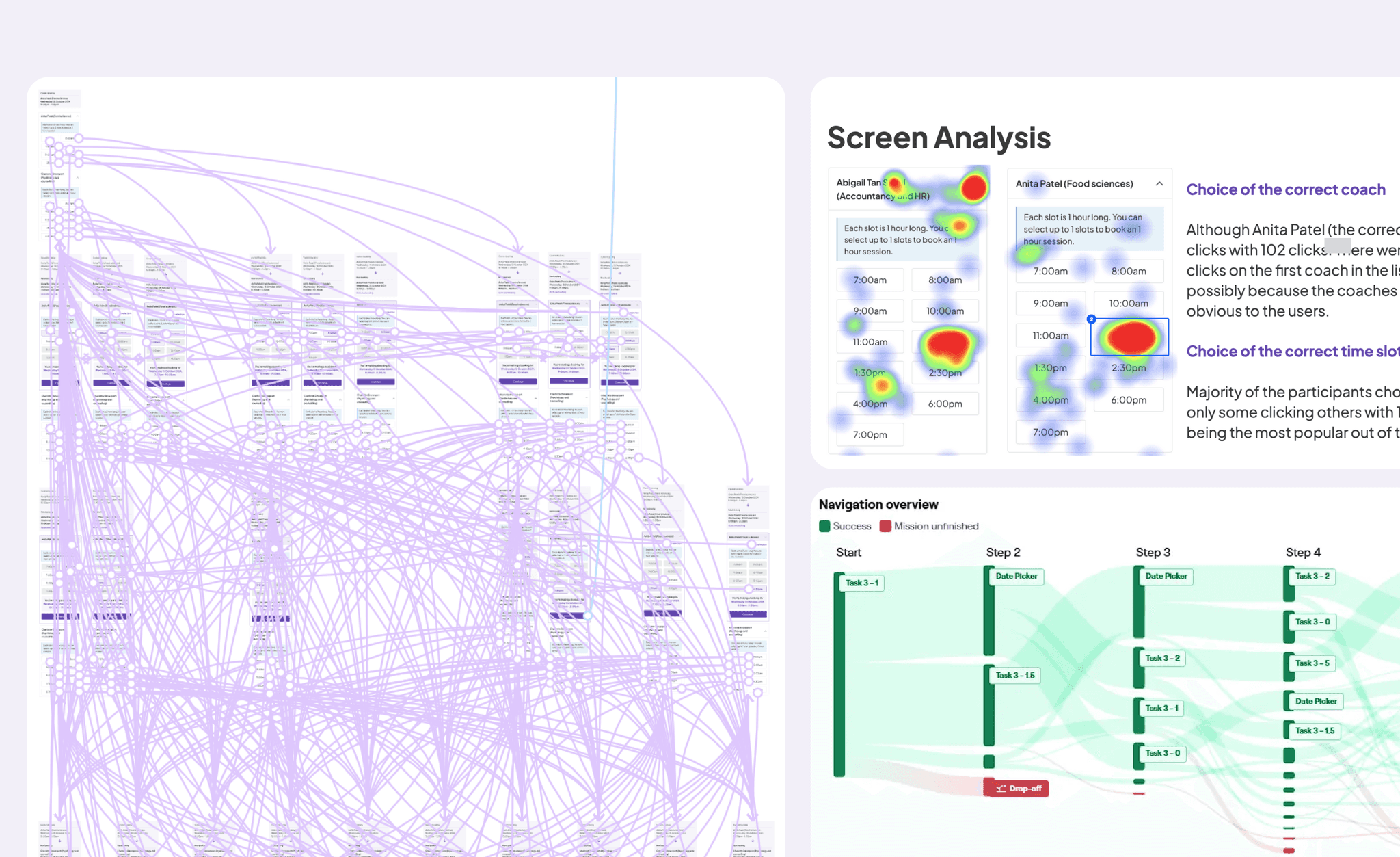
Multi-Select Logic Screen Analysis

Insight #3

More participants tapped 11:00am (Maximum Available Slot) than 10:00am slot (Consecutive Slot).

Therefore, it aligned with our assumption that users are more likely to click on the maximum available slots than consecutive slots to book multiple slots.

(To note: due to the nature of the component which adds a few pixels, the 2nd/3rd clicks will shift downwards on maze by a few pixels if the participant had clicked the timeslot.)

Insight #3

More participants tapped 11:00am (Maximum Available Slot) than 10:00am slot (Consecutive Slot).

Therefore, it aligned with our assumption that users are more likely to click on the maximum available slots than consecutive slots to book multiple slots.

(To note: due to the nature of the component which adds a few pixels, the 2nd/3rd clicks will shift downwards on maze by a few pixels if the participant had clicked the timeslot.)

Design System

My work on design system includes migration of design tokens to a new design system, documentation of existing design elements and creation of design system components using atomic principles on new and existing designs.

My work on design system includes migration of design tokens to a new design system, documentation of existing design elements and creation of design system components using atomic principles on new and existing designs.

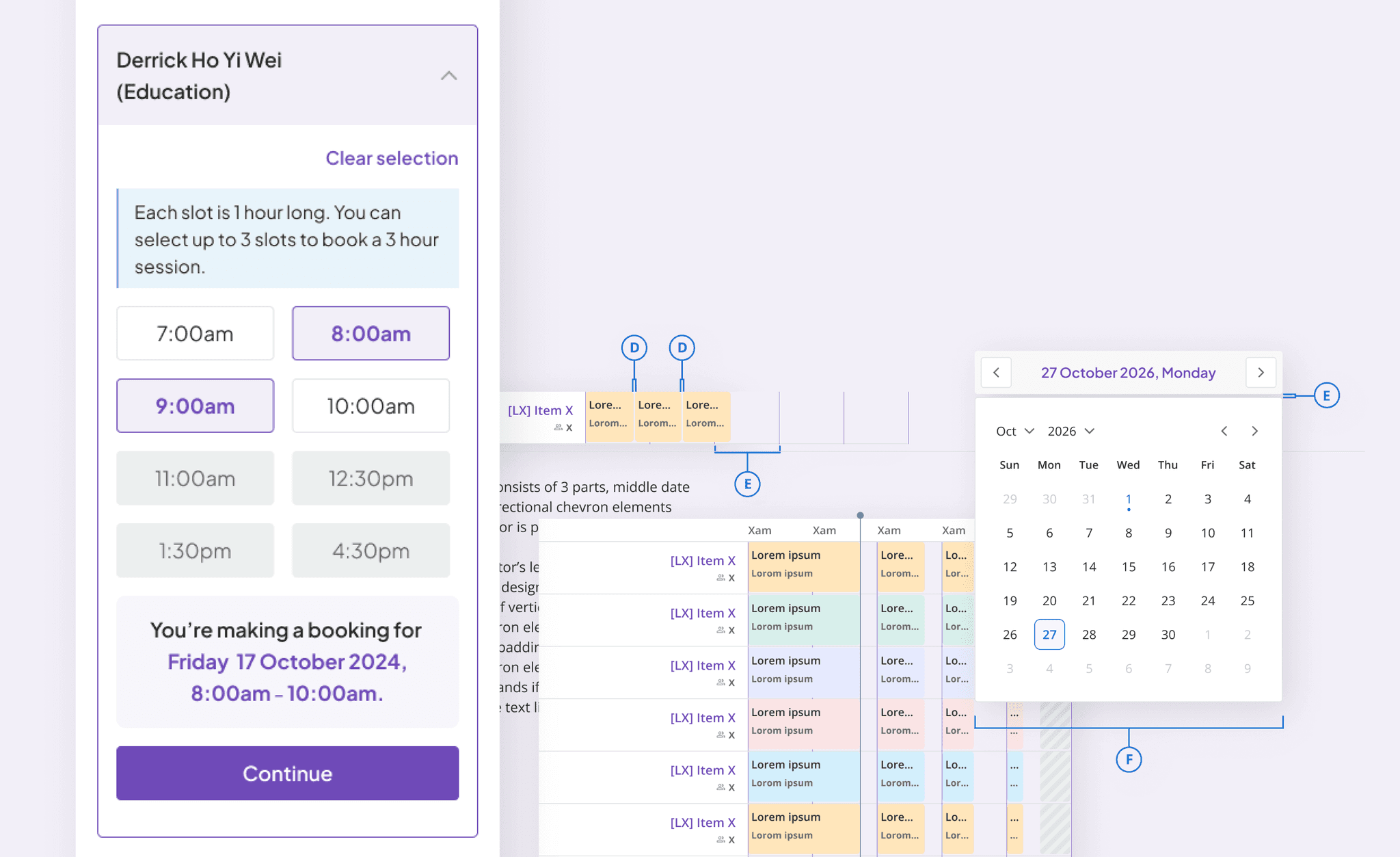
Selected Work : Timetable Component

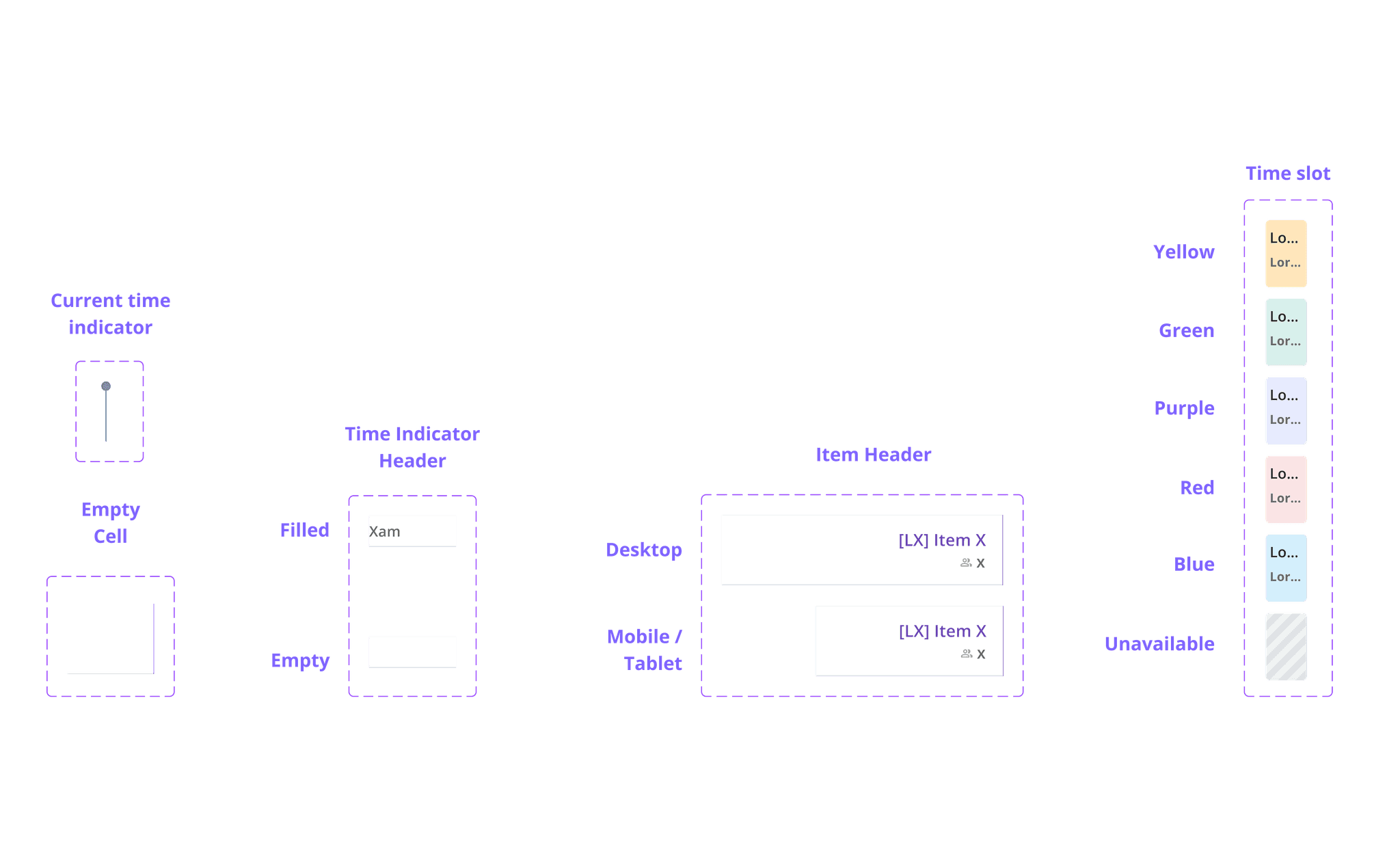
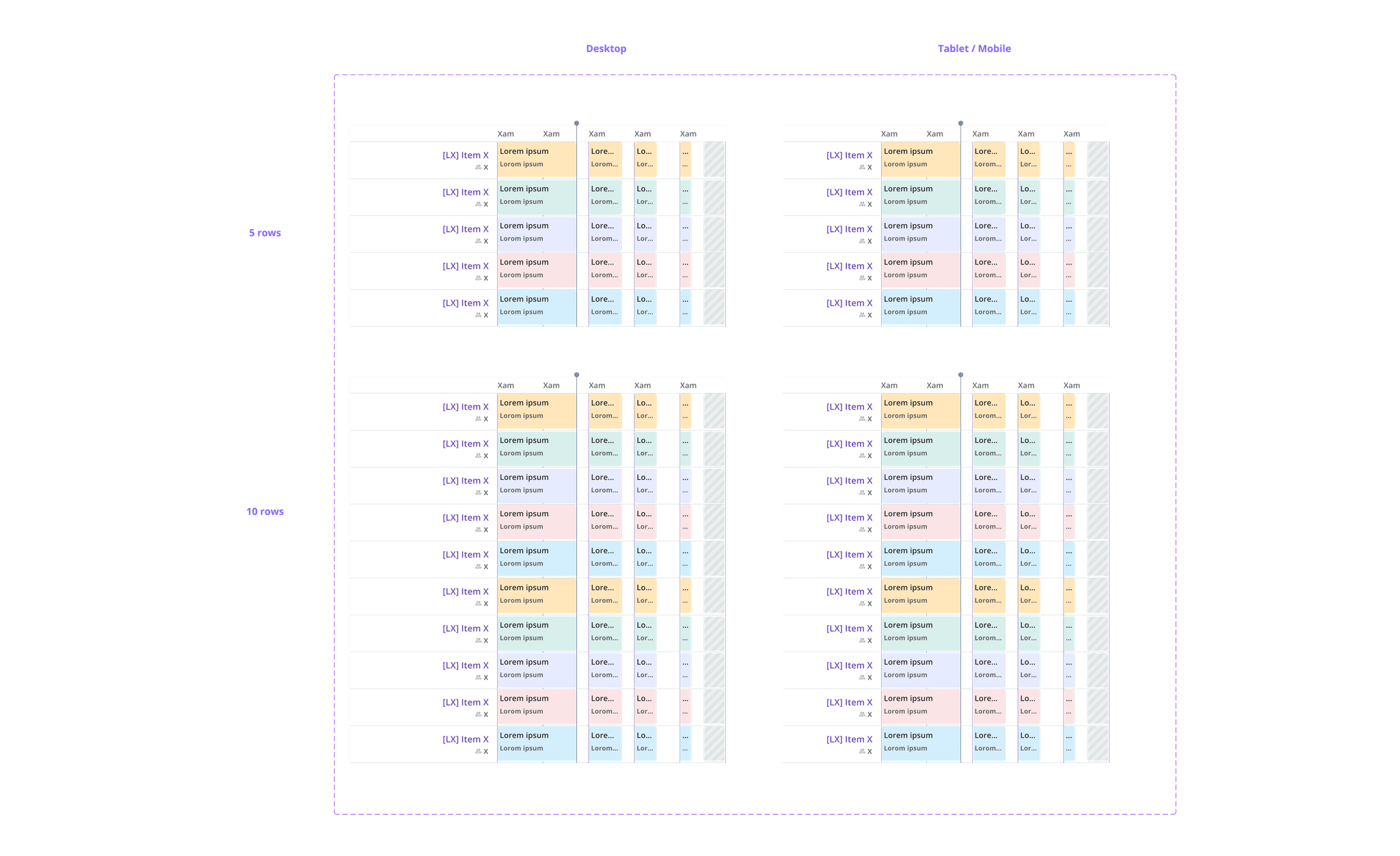
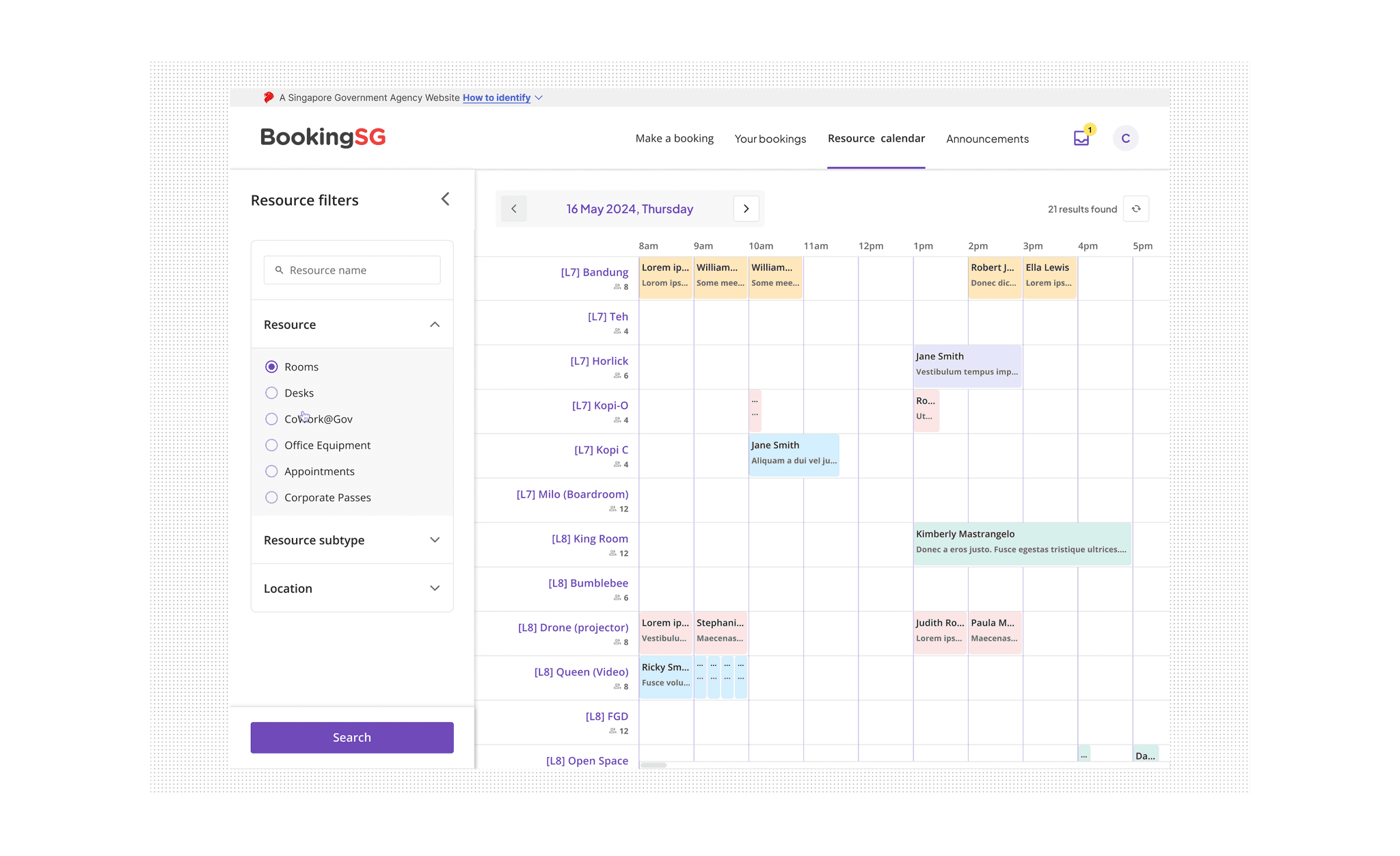
The timetable component was a legacy design that was previously used without documentation by prior designers. The task was to break down the elements of existing timetable component and redesign it to be flexible for it to be used across not just BookingSG team but throughout the entire cluster of GovTech that shares the same design system.

The timetable component was a legacy design that was previously used without documentation by prior designers. The task was to break down the elements of existing timetable component and redesign it to be flexible for it to be used across not just BookingSG team but throughout the entire cluster of GovTech that shares the same design system.

Atomic Elements
Timetable Component using Atomic Elements
Example of Timetable Usage
Atomic Elements
Timetable Component using Atomic Elements
Example of Timetable Usage

Let's work
Together!

Let's work
Together!